
-
NEW! LOWEST RATES EVER -- SUPPORT THE SHOW AND ENJOY THE VERY BEST PREMIUM PARACAST EXPERIENCE! Welcome to The Paracast+, 11 years young! For a low subscription fee, you can download the ad-free version of The Paracast and the exclusive, member-only, After The Paracast bonus podcast, featuring color commentary, exclusive interviews, the continuation of interviews that began on the main episode of The Paracast. We also offer lifetime memberships! Flash! Take advantage of our lowest rates ever! Act now! It's easier than ever to susbcribe! You can sign up right here!

You are using an out of date browser. It may not display this or other websites correctly.
You should upgrade or use an alternative browser.
You should upgrade or use an alternative browser.
Western Provinces of Canada Separate?
- Thread starter Tyger
- Start date
Free episodes:

Randall
J. Randall Murphy
@Randall Could you explain again how to have a video start at a particular spot? You did it once before and now I can't find those instructions. I'm having a problem with the last video I've posted above - it keeps starting at the end rather than the beginning. Thank you.
Sure — no problem, but only for desktop systems. I don't know how it works on mobile devices like phones.
For YouTube videos:
- Go to where you want the video to start.
- Select the Share icon below the video.
- Check the box in the lower left that says "Start at".
- Select the Copy icon
- Paste the copied link into your post.


Tyger
Administrator
Interesting short video that came through my feed - she is Canadian and is a Canadian analyst.
From Sarah capitalinsights -
"The EU is openly pursuing technological sovereignty: reducing strategic dependence on non-European providers across chips, cloud, AI, software and digital infrastructure. In June 2026, the European Commission launched its Tech Sovereignty Package, including Chips Act 2.0 and the Cloud and AI Development Act.
"Canada is moving deeper into that ecosystem too. The EU–Canada Digital Partnership, launched in 2023, covers AI, digital identity, semiconductors, cybersecurity, connectivity and data governance. And in March 2026, Canada and the EU formally launched negotiations for a Digital Trade Agreement.
"Meanwhile, Washington is using export controls, tariffs and domestic-manufacturing requirements to protect strategic technology and supply chains. So the real question is: Can Canada remain economically dependent on the U.S. while moving further into Europe’s digital and regulatory architecture?
"And underneath the digital battle sits the physical one: critical minerals. Lithium. Cobalt. Graphite. Rare earths. Gallium. Germanium. AI, chips, data centres and digital infrastructure all depend on them. That means this isn’t just about apps, identity wallets or cloud services. It is about technology, minerals, standards, sovereignty and power.
 Europe wants more digital autonomy.
 America wants to preserve technological advantage.
 Canada is trying to navigate both.
"Two systems. One Canada."
P.S. Sovereignty of whatever stripe is in keeping with the American System of Political Economy that Trump is initiating, so no problem from the US's perspective in this new global economic structure. It's what Canada is initiating for itself with digital ID that should concern Canadians.
{Video Run Time 14:21]

 www.facebook.com
From Sarah capitalinsights -
"The EU is openly pursuing technological sovereignty: reducing strategic dependence on non-European providers across chips, cloud, AI, software and digital infrastructure. In June 2026, the European Commission launched its Tech Sovereignty Package, including Chips Act 2.0 and the Cloud and AI Development Act.
"Canada is moving deeper into that ecosystem too. The EU–Canada Digital Partnership, launched in 2023, covers AI, digital identity, semiconductors, cybersecurity, connectivity and data governance. And in March 2026, Canada and the EU formally launched negotiations for a Digital Trade Agreement.
"Meanwhile, Washington is using export controls, tariffs and domestic-manufacturing requirements to protect strategic technology and supply chains. So the real question is: Can Canada remain economically dependent on the U.S. while moving further into Europe’s digital and regulatory architecture?
"And underneath the digital battle sits the physical one: critical minerals. Lithium. Cobalt. Graphite. Rare earths. Gallium. Germanium. AI, chips, data centres and digital infrastructure all depend on them. That means this isn’t just about apps, identity wallets or cloud services. It is about technology, minerals, standards, sovereignty and power.
Europe wants more digital autonomy. America wants to preserve technological advantage. Canada is trying to navigate both."Two systems. One Canada."
P.S. Sovereignty of whatever stripe is in keeping with the American System of Political Economy that Trump is initiating, so no problem from the US's perspective in this new global economic structure. It's what Canada is initiating for itself with digital ID that should concern Canadians.
{Video Run Time 14:21]
72K views · 5.2K reactions | The EU is openly pursuing technological sovereignty: reducing strategic dependence on non-European providers across chips, cloud, AI, software and digital infrastructure. In June 2026, the European Commission launched its
The EU is openly pursuing technological sovereignty: reducing strategic dependence on non-European providers across chips, cloud, AI, software and digital infrastructure. In June 2026, the European...
www.facebook.com
Tyger
Administrator
Special Visas for Canadian Defectors - youzah! If Carney wins the election, he's saying Alberta, Saskatchewan, Manitoba, and Yukon will be willing to become independant states, making a deal with the US to become US Territories [better deal imo]. Bordering Conservative Red states.
 www.facebook.com
602K views · 68K reactions | Special VISAs for Canadian defectors | northernlibertymatt
Special VISAs for Canadian defectors
www.facebook.com
Tyger
Administrator
Canadian issues warning to Americans about voting.

Tyger
Administrator
Trump Woke Up The World. Canada's Government Is The Globalists' Last Defense
Published October 9, 2026: [Video Run Time 55:17] Rich Does Politics / SHIMJELLY TV
TIMESTAMPS
00:00 Why the media is now the government
02:19 Danielle Smith, from media to premier
04:14 Elected on fan base, not constituency
06:04 Freeland, Lantsman and Uppal: media into Parliament
10:10 Alberta separatism, the pipeline and Pathways carbon capture
12:58 Bankers in politics: is this just Canada?
20:12 Who funds the media? Banks, BlackRock and Vanguard
22:18 Safe and effective: the media that gaslit Canada
24:17 Evan Solomon, fired from CBC and rehired
27:23 Government money for the media during lockdown
33:37 The Alberta referendum and the Sovereignty Act
37:52 The Unity tour: Carney, Smith and the pipeline
41:42 Why Ottawa can't let Alberta go
46:55 Foreign recruits for the Canadian military
52:31 Terror cells and a flashpoint with the US
Published October 9, 2026: [Video Run Time 55:17] Rich Does Politics / SHIMJELLY TV
TIMESTAMPS
00:00 Why the media is now the government
02:19 Danielle Smith, from media to premier
04:14 Elected on fan base, not constituency
06:04 Freeland, Lantsman and Uppal: media into Parliament
10:10 Alberta separatism, the pipeline and Pathways carbon capture
12:58 Bankers in politics: is this just Canada?
20:12 Who funds the media? Banks, BlackRock and Vanguard
22:18 Safe and effective: the media that gaslit Canada
24:17 Evan Solomon, fired from CBC and rehired
27:23 Government money for the media during lockdown
33:37 The Alberta referendum and the Sovereignty Act
37:52 The Unity tour: Carney, Smith and the pipeline
41:42 Why Ottawa can't let Alberta go
46:55 Foreign recruits for the Canadian military
52:31 Terror cells and a flashpoint with the US

Burnt State
Paranormal Adept
This is an excerpt from Charlie Angus, former Northern Ontario politician, radical musician and ongoing political commentator focusing on leftist resistance to tyrannical US interference with Canadian Sovereignty. The most fascinating parts for me are the offer of 500 million from the US to support an independent Alberta, Republican Alberta members offering the Whitehouse delegation Canadian water rights.(Both of these are treasonous actions imho), the use of digital interference in elections by foreign actors and the American think tank advising how to divide Canada from within.
"The Globe and Mail has an explosive report that in those meetings, a group of separatists offered to turn over control of Canadian fresh water in exchange for the financial backing to break up our nation.
They had no mandate for talks.
And yet they were given top-level access in Washington.
This group of quislings didn’t bother to tell anyone in Alberta that “independence” was little more than a back room deal to sell off the water resources in a drought-stressed province.
Treason? What else could this be?
And yet don’t expect any consequences or investigations.
Premier Danielle Smith has bent herself backwards to support this betrayal by pushing a referendum the courts have already ruled illegal twice.
Canadian online spaces are being overrun with both US and Russian fake accounts driving disinformation and division. How much foreign money is flooding into our nation is hard to say, as Canadian officials continue to look the other way.
Similar concerns have been raised about possible interference helping the separatist wave in the Quebec election.
When Quebec Premier Christine Frechette raised concerns about US interference in the provincial election, she was subjected to eye-rolling and ridicule.
Never mind the fact that the United States has been actively interfering in elections in Brazil, Germany, and Colombia. They have used increasingly predatory language towards our nation.
The strategy to take down Canada from the inside has been there for all to see.
While Canadian leaders focus on massively building up our military capabilities and developing new drone powers, United States planners have been thinking of a whole other kind of warfare.
They understand that overt threats by the United States have only stiffened our resolve and driven new levels of patriotism.
In February, a US right-wing think tank, the Defence Analyses and Research Corporation (DARC), put forward the proposition that rather than openly attacking Canada, the White House should focus on exacerbating regional tensions.
Then the United States could pick up the pieces.
The “Centrifugal Strategy” paper calls on the United States to exploit points of division so that Canada will fall apart from the inside. Alberta and Quebec are two obvious targets. DARC specifically called for “covert support for PQ ahead of the election.”
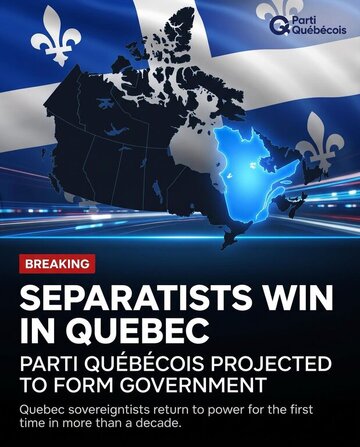
We learn that the Parti Québécois held meetings with the Alberta separatists on common cause. Plans were in place to meet with Trump officials. What online manipulation or foreign interference is now too late. The ballots are being cast and the PQ are on the road to a big victory.
The US strategy also maps out plans to exploit divisions between the Indigenous community and the white population, arguing that Canada has “capitulated to the Natives” and that it is necessary to “weaponize” reconciliation between Canada and First Nations to “slowly nudge” conflict.
Another target of their strategy is to build on anti-immigrant hate. You can see both anti-Indigenous and anti-immigrant sentiment being driven by BOT and rage farm groups across our online sphere. These elements are playing out with separatists in Alberta and Quebec.
I have warned about this style of warfare since I began The Resistance Substack. It’s why I refer to Danielle Smith as Donbas Danielle.
There are obvious parallels between the front group used to break Donbas from Ukraine and the group of Alberta punters meeting in the top corridors of power in Washington.
Last June I called on Foreign Influence Transparency Commissioner Anton Boegman to launch an investigation into the meetings between the Alberta separatists and US officials."
A more elaborate version can be ready here:
The Threat to Canada is Coming From the White House
"The Globe and Mail has an explosive report that in those meetings, a group of separatists offered to turn over control of Canadian fresh water in exchange for the financial backing to break up our nation.
They had no mandate for talks.
And yet they were given top-level access in Washington.
This group of quislings didn’t bother to tell anyone in Alberta that “independence” was little more than a back room deal to sell off the water resources in a drought-stressed province.
Treason? What else could this be?
And yet don’t expect any consequences or investigations.
Premier Danielle Smith has bent herself backwards to support this betrayal by pushing a referendum the courts have already ruled illegal twice.
Canadian online spaces are being overrun with both US and Russian fake accounts driving disinformation and division. How much foreign money is flooding into our nation is hard to say, as Canadian officials continue to look the other way.
Similar concerns have been raised about possible interference helping the separatist wave in the Quebec election.
When Quebec Premier Christine Frechette raised concerns about US interference in the provincial election, she was subjected to eye-rolling and ridicule.
Never mind the fact that the United States has been actively interfering in elections in Brazil, Germany, and Colombia. They have used increasingly predatory language towards our nation.
The strategy to take down Canada from the inside has been there for all to see.
While Canadian leaders focus on massively building up our military capabilities and developing new drone powers, United States planners have been thinking of a whole other kind of warfare.
They understand that overt threats by the United States have only stiffened our resolve and driven new levels of patriotism.
In February, a US right-wing think tank, the Defence Analyses and Research Corporation (DARC), put forward the proposition that rather than openly attacking Canada, the White House should focus on exacerbating regional tensions.
Then the United States could pick up the pieces.
The “Centrifugal Strategy” paper calls on the United States to exploit points of division so that Canada will fall apart from the inside. Alberta and Quebec are two obvious targets. DARC specifically called for “covert support for PQ ahead of the election.”
We learn that the Parti Québécois held meetings with the Alberta separatists on common cause. Plans were in place to meet with Trump officials. What online manipulation or foreign interference is now too late. The ballots are being cast and the PQ are on the road to a big victory.
The US strategy also maps out plans to exploit divisions between the Indigenous community and the white population, arguing that Canada has “capitulated to the Natives” and that it is necessary to “weaponize” reconciliation between Canada and First Nations to “slowly nudge” conflict.
Another target of their strategy is to build on anti-immigrant hate. You can see both anti-Indigenous and anti-immigrant sentiment being driven by BOT and rage farm groups across our online sphere. These elements are playing out with separatists in Alberta and Quebec.
I have warned about this style of warfare since I began The Resistance Substack. It’s why I refer to Danielle Smith as Donbas Danielle.
There are obvious parallels between the front group used to break Donbas from Ukraine and the group of Alberta punters meeting in the top corridors of power in Washington.
Last June I called on Foreign Influence Transparency Commissioner Anton Boegman to launch an investigation into the meetings between the Alberta separatists and US officials."
A more elaborate version can be ready here:
The Threat to Canada is Coming From the White House
Burnt State
Paranormal Adept
And there are some very specific pragmatic and historical reasons for this that are worth noting. Once you're north of 150 kilometres you are into the Cabadian shield - it's solid granite and impossible to build, live or farm upon. Further into central Canada you get into the northern shield. We are a country of vast wilderness zones. You could fit four Americas into the wild, unpopulated areas of Canada.Fun Fact - 90% of the Canadian population lives within 150 miles of the US-Canadian border. Wild.
Within 100 miles of the US border there is 76% of the population. There's a lot of resource based reasons for this along with transportation zones that are part of moving goods across this vast nation.
The further south you go the warmer the climate,, so that's a major determining factor for why Canadians live where we live. There is also the economic history of our shared geology. The critical St. Lawrence Seaway used by both nations is a part of what has joined us economically, and what we both once took great pride in calling the longest undefended border on the planet.
Unfortunately, Trump had to go and ruin all that with insults, injury, dismissiveness of our shared war history as allies, along with lies regarding how much drugs flows from Canada through to America vs. the vast quantities of drugs and guns that flow from US to Canada. His trade rhetoric is his usual cabal of invention, lies and "alternate facts"

I grew up in a twin city town where the US and Canada shared a border across St. Mary's River and both our communities are called Sault Ste. Marie. Every summer athletes from across the borders joined together to compete in what we called the Friendship Games.

The attack upon Canada by Trump and his attempt to foment divisiveness through separation rhetoric, courting the Alberta Separationists with $$$ and his talk of us becoming a new state is the most juvenile undiplomatic thing I could ever think an American president could say about Canada.
Here are some quotes from Ronald Regan about Canada to help put Trump in better context:
"Winston Churchill once noted: 'That long Canadian frontier from the Atlantic to the Pacific Oceans, guarded only by neighborly respect and honorable obligations, is an example to every country and a pattern for the future of the world.'"
(From his Radio Address to the Nation on the United States-Canada Free Trade Agreement, January 9, 1988)
"Like our own citizens earlier this month, our neighbors have sent a strong message rejecting protectionism and reaffirming that more trade, not less, is the wave of the future."
(From his radio address following the 1988 Canadian election regarding Prime Minister Brian Mulroney and free trade)
To this day I still blame all the Alberta right wing BS on its history of being populated by KKK after they were disbanded in America. But that's Canada for you, politely taking on the world's problems through immigration, as we always do.
Tyger
Administrator
"Quebec's new government was just sworn in. Charles III wasn't invited. On Oct. 15, 59 PQ members pledged loyalty to the people of Quebec. Not to a king in England.
"Paul St-Pierre Plamondon called it the first time a governing party skipped the monarchy: 'We will work for Quebec and only for Quebec. We will be masters in our own home.' Then: 'Vive le Québec libre.'
"Even Quebec Liberal leader Charles Milliard says he has 'no intention' of swearing to the King.
"Now a group of monarchists wants a judge to force them to swear to the King. Good luck with that."
"Paul St-Pierre Plamondon called it the first time a governing party skipped the monarchy: 'We will work for Quebec and only for Quebec. We will be masters in our own home.' Then: 'Vive le Québec libre.'
"Even Quebec Liberal leader Charles Milliard says he has 'no intention' of swearing to the King.
"Now a group of monarchists wants a judge to force them to swear to the King. Good luck with that."